 Odin
OdinKnow exactly what to study, every day.
Add your tests and homework once. Odin turns them into a day-by-day plan around your classes, calendar and life, tells you what to do first, and keeps the plan up to date when things change.
- Free to start
- No ads, no tracking
- Same plan on every device
A planner that thinks like a tutor
Most planners only store your deadlines. Odin works out how to actually get ready for them.
Add anything in one line
Type “History essay 3h Friday” and it’s planned. Odin reads the time and the date and files it under the right class.
Plans around your real life
Odin reads your calendar to find your free time and only plans in the gaps, with more time on weekends and school breaks.
Test prep, done properly
Each test is split into parts, each studied on spaced-out days: learn, deep practice, fix what went wrong, redo it, final review.
Focus timer and check-ins
Start a session in one tap. If you didn’t finish, Odin moves it to the next day with room and tells you where it went.
School sync
Sign in to Schoology, Canvas, Google Classroom or AP Classroom and Odin finds every test, assignment and grade for you. Pro+
A study coach every morning
What to do today, in what order, and why, from your plan, grades and weak spots. Plus practice questions at your class’s level. Pro
Set up in about two minutes
Tell Odin your week
Your classes, when you’re free and how long you can focus. Connect your calendar so Odin plans around everything else.
Add what’s coming up
One line each, like Chem unit 2 test Oct 21, or let School sync find it all for you.
Open Odin and press start
Today shows what to do next and why. Tick it off and Odin keeps the rest of the week balanced.
Ready for the test, not just reminded of it
A test with two parts, like Unit 5 split into 5.1–5.4 and 5.5–5.8, gets a schedule like this. Each part comes back at the right moment, and the day before is one full practice run.
- Day 1 · Learn. Notes, videos and worked examples.
- Day 2 · Deep practice. Every type of problem; mark what you missed.
- Day 3 · Fix the hard ones. Work out why they went wrong.
- Day 5 · Redo what you missed. From scratch, no notes.
- Day 7 · Final review. Mixed, timed, test-style.
Everything in one place
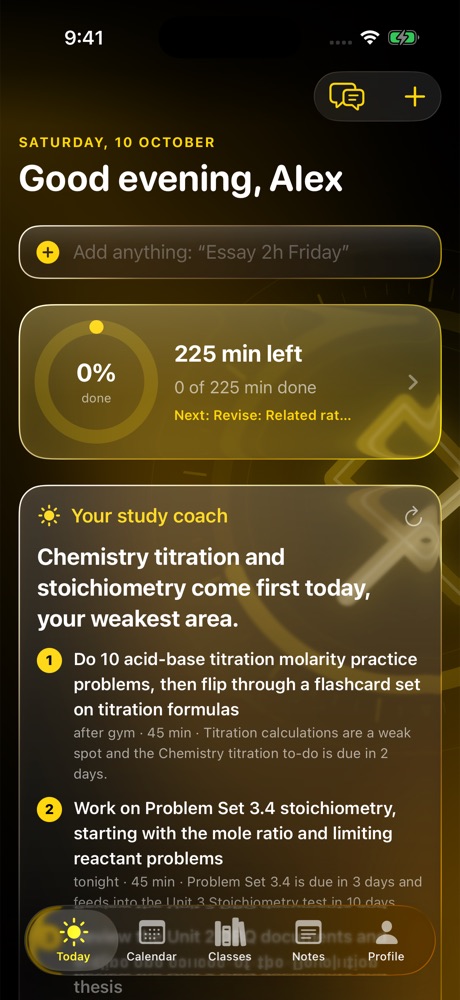
Your daily coach
What to study today, and why.
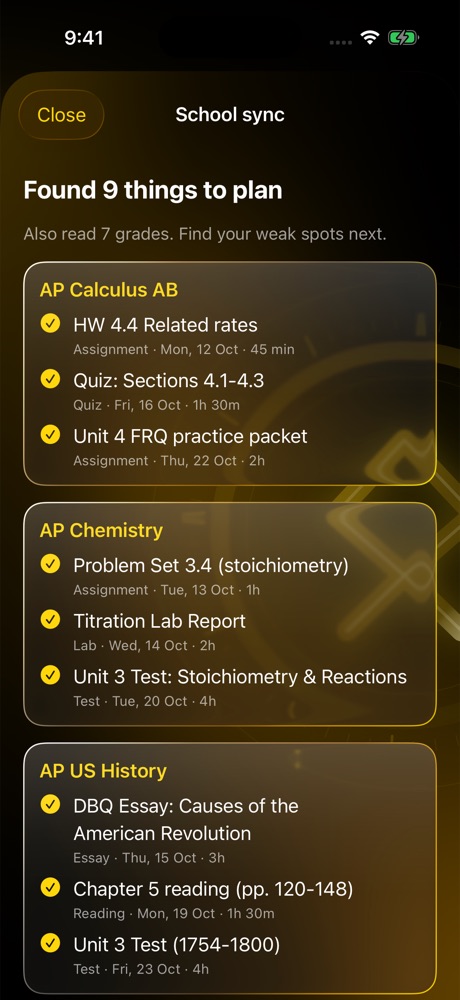
School sync
Every test and assignment, found for you.
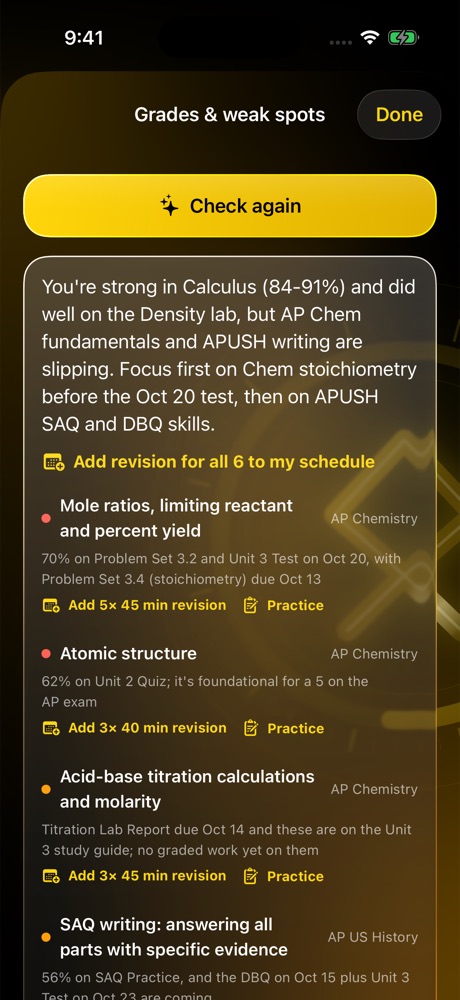
Weak spots
From your grades to extra practice.
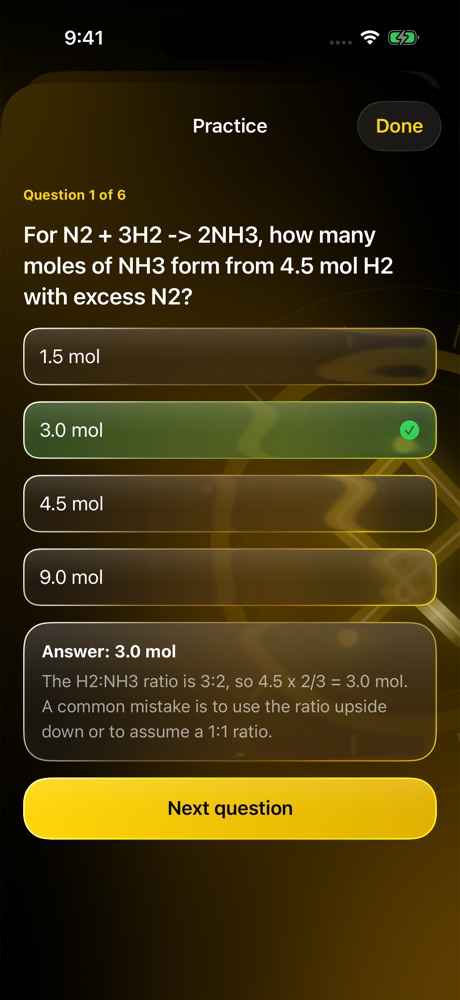
Practice
Questions at your class’s level.
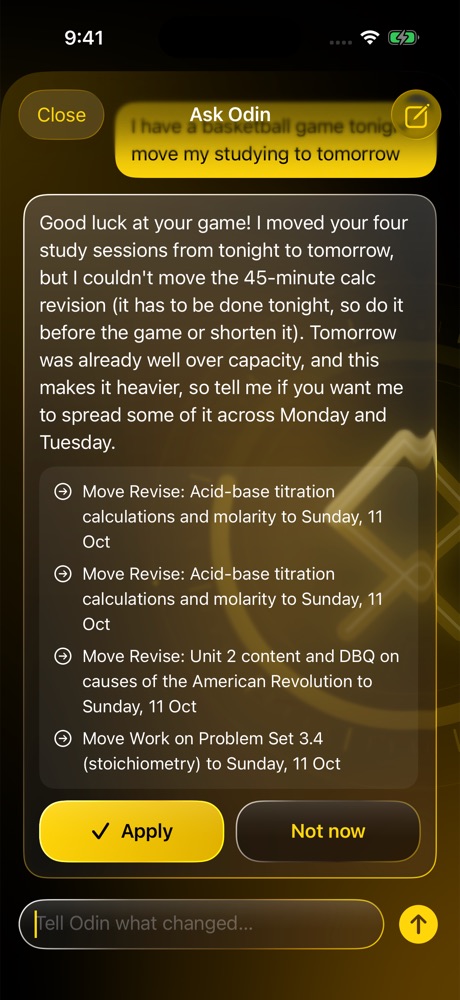
Talk to your tutor
“Move chem to tomorrow.” Done.
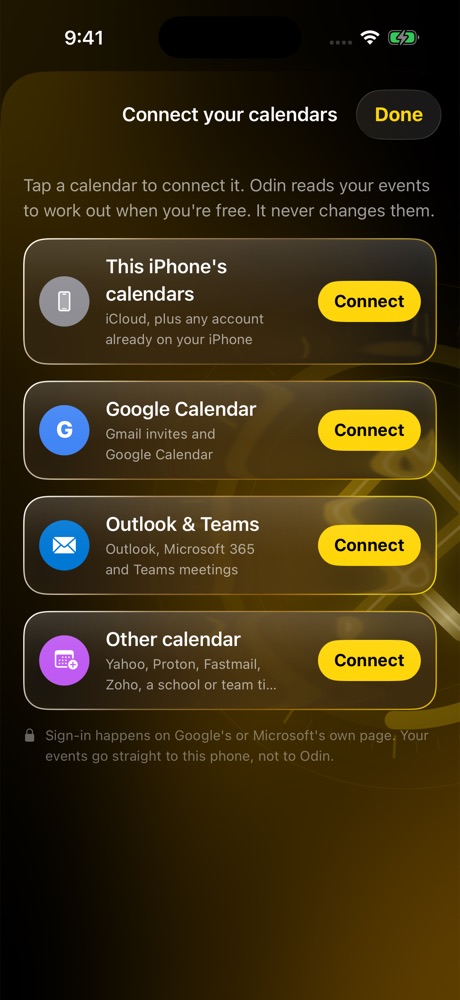
Your calendars
Google, Outlook and iCloud, read-only.
How Odin uses your calendar
You can connect Google Calendar, Outlook / Microsoft 365 (including Teams meetings) or your device’s calendars. Odin reads your events for two things only: to work out when you’re free, so it never plans over a class, shift or meeting, and to spot tests and deadlines you can add in one tap.
Read-only
Odin never creates, changes or deletes events, and you can disconnect a calendar at any time.
Stays on your device
Your calendar events are kept on your device. They are never uploaded to Odin’s servers or shared with anyone.
No ads, no tracking
No analytics, no ads, and your data is never sold. The full details are in the privacy policy.
Free planner. Tutor when you want it.
Planning, the calendar, study passes, check-ins, notes and the focus timer are free. Every paid plan starts with a free week.
Free
- One-line adding
- Calendar-aware plans
- Study passes for tests
- Focus timer & check-ins
- Notes and reminders
Pro
- Everything in Free
- Daily coach
- Study guide photo to plan
- AI time estimates
- Balanced days
Pro+
- Everything in Pro
- School sync
- Weak spots from grades
- Practice questions
- Estimates tuned to your pace
Max
- Everything in Pro+
- Talk to your tutor
- Extra practice from the web
- Smartest estimates
US prices. Subscriptions are bought in the Odin app and renew automatically; cancel any time in your Apple ID settings.
Questions
Is Odin free?
Yes. The planner is free on every device, with no time limit and no ads. The paid plans add AI tutor features, and each starts with a free week.
Which devices does Odin work on?
Odin is an app for iPhone, iPad and Mac, coming soon to the App Store, and a website you can use now at odinplanner.app/app. Sign in with the same account and the same plan shows up everywhere.
Does Odin change my calendar?
No. Calendar access is read-only. Odin uses your events to find your free time and to spot tests and deadlines, and your events stay on your device.
How does School sync work?
You open your school’s site inside Odin and sign in yourself. Odin then goes through each class and lists the tests, assignments and grades it finds, and you choose what to add. It only reads, never submits or changes anything, and your password goes straight to your school.
Do I need an account?
No. Odin works on one device without an account. Sign in with Google or an email link only if you want the same plan on more than one device or on the web.
How do I get help?
Email odinplanner.app@gmail.com or see the support page.